Using AWS Lambda to Trigger Data Flows
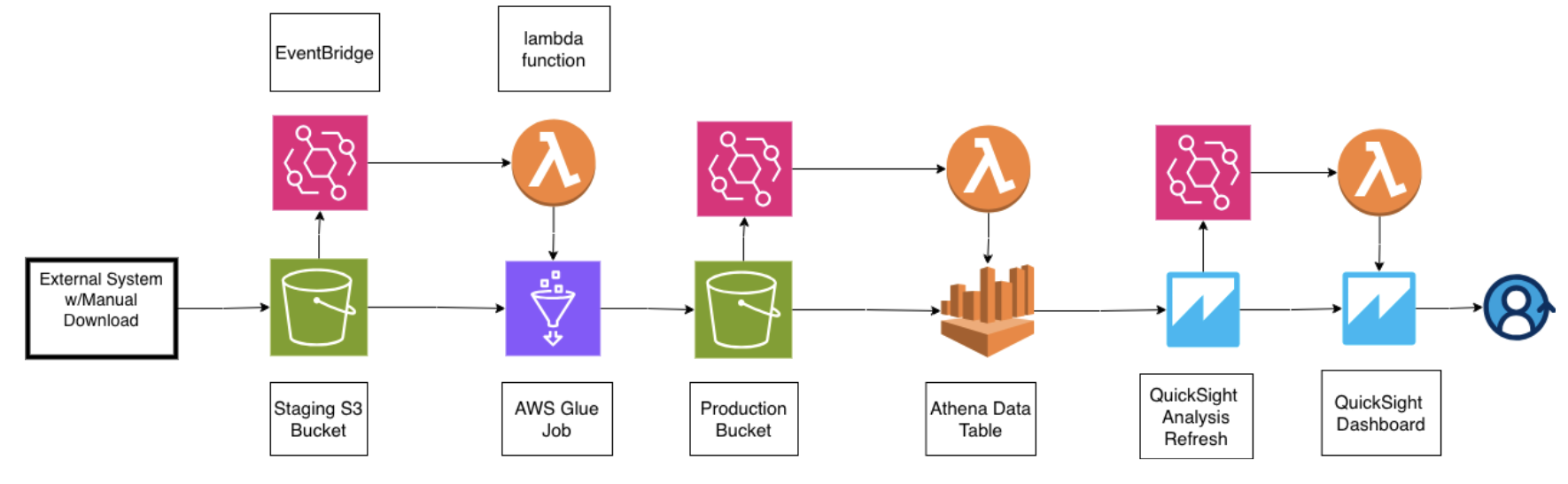
Event-driven data pipeline architecture using S3, AWS Lambda, Glue, and QuickSight
Modern data pipelines need to be both automated and cost-efficient. When you're processing data for business intelligence dashboards, there may be use cases where a scheduled data ingestion is not practical or available. Often times, what that means is that you or a client will need to upload an external data source to use. At the same time as the builder, you don't want to manage that process or have it be a process consuming your time. As a builder you want to automate everthing as much as possible. So imagine you've set up your client on a AWS console and what you need is for them to upload data as needed and utlimately have your dashboard (QuickSight in this case) autorefresh. So how do you do that ? ...
This is where event-driven architecture comes into play and proofs powerful. Instead a scheduled run, your pipeline activates only when it needs to: the moment new data arrives in the designated S3 bucket.
The Challenge
I recently built a DOT compliance monitoring system for a trucking client. The workflow required:
- Processing CSV timecard data uploaded to S3
- Running ETL transformations to detect hours-of-service violations
- Updating an Athena data catalog with new records
- Refreshing QuickSight dashboards for real-time visibility
The charge here is to provide an automated process to the client, with the only manual element being the data upload. So what we needed was a system that responded instantly to new data while maintianing the same expection as we would have for a scheduled data job.
Event-Driven Architecture with Lambda
The solution uses AWS Lambda functions orchestrated through EventBridge to create a cascading pipeline:
Step 1: S3 Upload Trigger
When a CSV file is uploaded to the landing S3 bucket, EventBridge detects the PutObject event and triggers the first Lambda function.
Step 2: Lambda Initiates Glue Job
The Lambda function starts an AWS Glue ETL job that processes the raw CSV data. Glue handles the heavy lifting: data validation, transformation, and partitioning by station code and date using Hive-style formatting.
Step 3: Crawler Updates Catalog
Once the Glue job completes, another EventBridge rule detects the success state and triggers a Lambda function to start the Glue crawler. The crawler scans the processed data in the production bucket and updates the Athena data catalog with new partitions.
Step 4: QuickSight Refresh
When the crawler finishes, a final Lambda function triggers a QuickSight dataset refresh, ensuring dashboards display the latest compliance metrics within minutes of data upload.
Technical Implementation
EventBridge Rules
EventBridge acts as the nervous system of this architecture, routing events between services without tight coupling:
{
  "source": ["aws.s3"],
  "detail-type": ["Object Created"],
  "detail": {
    "bucket": {
      "name": ["dsp-bi-landing-prototype-v1"]
    }
  }
}
Lambda Function Structure
Each Lambda function follows a simple pattern: receive the event, validate the payload, invoke the next service, and handle errors gracefully. Here's the core logic for starting a Glue job:
import boto3
import json

glue = boto3.client('glue')

def lambda_handler(event, context):
    try:
        # Extract S3 details from event
        bucket = event['detail']['bucket']['name']
        key = event['detail']['object']['key']

        # Start Glue job
        response = glue.start_job_run(
            JobName='dsp-etl-job',
            Arguments={
                '--source_bucket': bucket,
                '--source_key': key
            }
        )

        return {
            'statusCode': 200,
            'body': json.dumps({
                'jobRunId': response['JobRunId']
            })
        }
    except Exception as e:
        print(f"Error: {str(e)}")
        raise
Why This Architecture Works
Cost Efficiency
Lambda's pay-per-invocation model means you only pay for actual processing time. No idle compute resources.
Near Real-Time Processing
Data flows from upload to dashboard in 2-5 minutes. Critical metrics appear in dashboards immediately when they matter most.
Scalability
Lambda automatically scales to handle concurrent uploads. During month-end when multiple stations upload simultaneously, the pipeline processes everything in parallel without configuration changes.
Maintainability
Each Lambda function has a single responsibility, making debugging straightforward. CloudWatch Logs provide visibility into every step, and failed invocations can be replayed without reprocessing the entire pipeline.
Lessons Learned
1. Idempotency Matters
Lambda functions can be invoked multiple times for the same event. I learned to design each function to be idempotent—running it twice produces the same result as running it once. This means checking if a Glue job is already running before starting a new one.
2. Error Handling Is Critical
Network timeouts, permission errors, and malformed data will happen. Each Lambda function needs robust error handling and should fail gracefully without breaking the entire pipeline. I use try-except blocks with detailed logging to diagnose issues quickly.
3. Event Filtering Saves Money
Early versions triggered on every S3 event, including metadata updates and deletions. By filtering EventBridge rules to only respond to PutObject events in specific prefixes, we eliminated 80% of unnecessary Lambda invocations.
4. Dead Letter Queues for Resilience
Lambda functions can fail for reasons outside your control—AWS service throttling, temporary network issues. Configuring Dead Letter Queues (DLQs) ensures failed invocations aren't lost and can be retried during off-peak hours.
Key Takeaways
Event-driven architectures with AWS Lambda transform batch processing workflows into responsive, and efficient pipelines. The combination of EventBridge for orchestration, Lambda for compute, and managed services like Glue and Athena means you can build production-grade data pipelines without managing servers.
This pattern isn't just for compliance monitoring—it applies to any scenario where data arrives unpredictably and needs to flow through multiple transformation steps. Whether you're processing customer uploads, integrating third-party data feeds, or building real-time analytics, Lambda-triggered pipelines offer a scalable, maintainable solution.
If you would like to know about this architecture, the process and my epxerience implementing it, email me: lawrencekarongo@gmail.com.